Tesla’s huge Summer Update this year includes several exciting features, including Grok vehicle commands (video), Driving Visualization Zoom, Caraoke singing à la Rock Band, and one more that we thought we wouldn’t see for a while — personalized navigation routes.
While Preferred Routes was a highlight of the Summer Update, it turns out you don’t actually need the 2026.26 car update to start taking advantage of personalized routing.
Preferred Routes

RahRahRasputin_ / Reddit

VLoops11 / X
Swipe to browse photos
Click the arrows to browse
1 / 2
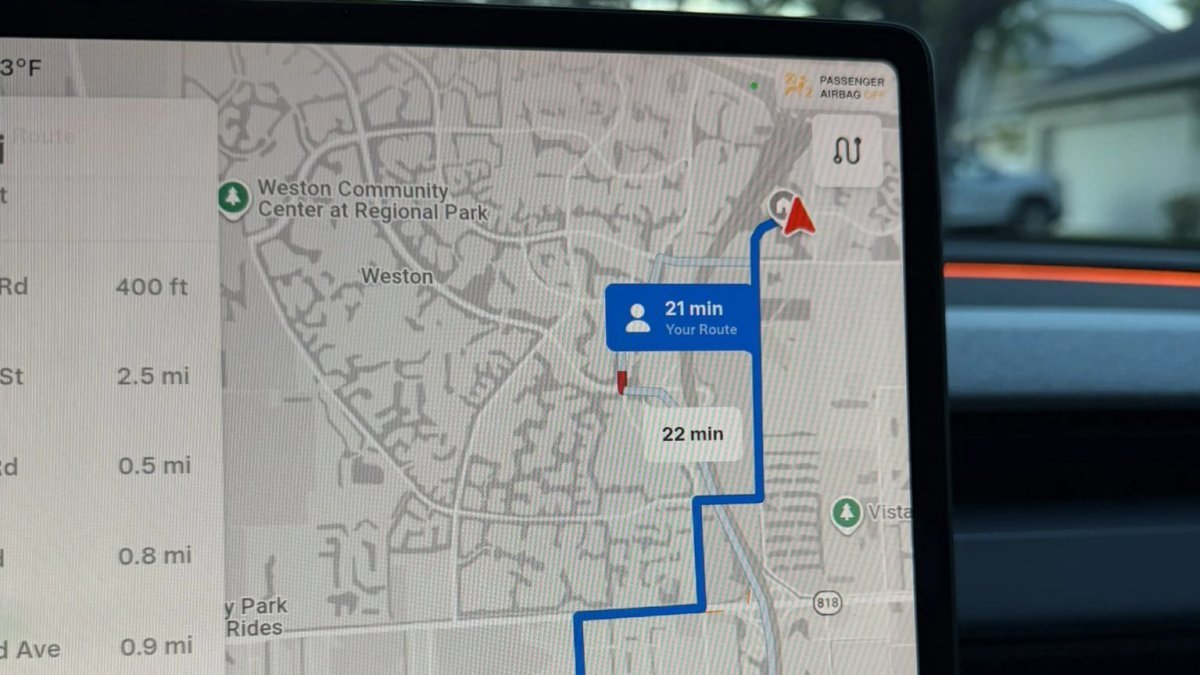
With Preferred Routes, the vehicle tracks the routes you take most often to each destination and will then consider your own route, among others. If your route is within a reasonable time of the fastest route, then the vehicle will choose your preferred route to the destination.
This feature relies on Tesla’s Alternate Routes feature, which is displayed at the beginning of a drive (you can also view alternate routes at any time by tapping Next Turn at the top of the directions list). Alternate routes were added in 2022, where the vehicle suggests multiple routes to your destination, letting you pick from up to three choices. With this update, if the vehicle has stored enough data, “Your Route” will now be one of those choices.
Requires Map Update
While this new preferred routes feature is highlighted as part of Tesla’s summer release, many users are now seeing it with the latest maps update. Tesla started rolling out map update 2026.26 in North America, which started going out last week. Like software updates, Tesla rolls out map updates gradually.
They’re rolling out silently in the background, so you won’t see a notification that you received a new map update, and you’ll need to manually check by going to Controls > Software and scrolling down to Navigation Data.
Who Gets It
Currently, Tesla is limiting the Preferred Routes feature to the United States, so even if you’ve received map update 2026.26, you’ll need to be in the U.S. in order to see your personalized routes.
If you have already received the 2026.26 map update, you should start seeing personalized routes after you drive to the same location a handful of times.
Tesla states that you need to have online routing enabled to see preferred routes, but that’s the default setting and doesn’t require Premium Connectivity. Tesla also states that your location data is anonymous to Tesla and is not associated with your vehicle.
How It Works
Instead, your vehicle is likely tracking which turns you take to a particular location locally. It saves it and keeps track of how many times that exact route is used. When you choose a destination, the vehicle then likely sends your most popular route to that destination to Tesla. Tesla will then respond with the best routes to that destination, including the time to the destination using your most traveled route.
While Tesla uses most map-related features from Google, such as map tiles, satellite imagery, Points of Interest, traffic data, etc, the app itself is created by Tesla. Tesla also computes the routing to each destination itself, instead of relying on Google. This lets them build features like preferred routes, take Supercharging into account, and more.
This feature is available on all Tesla models with Intel or AMD infotainment units. You’ll instantly recognize the feature if you see “Your Route” as a label when the vehicle offers alternate routes at the beginning of a drive.