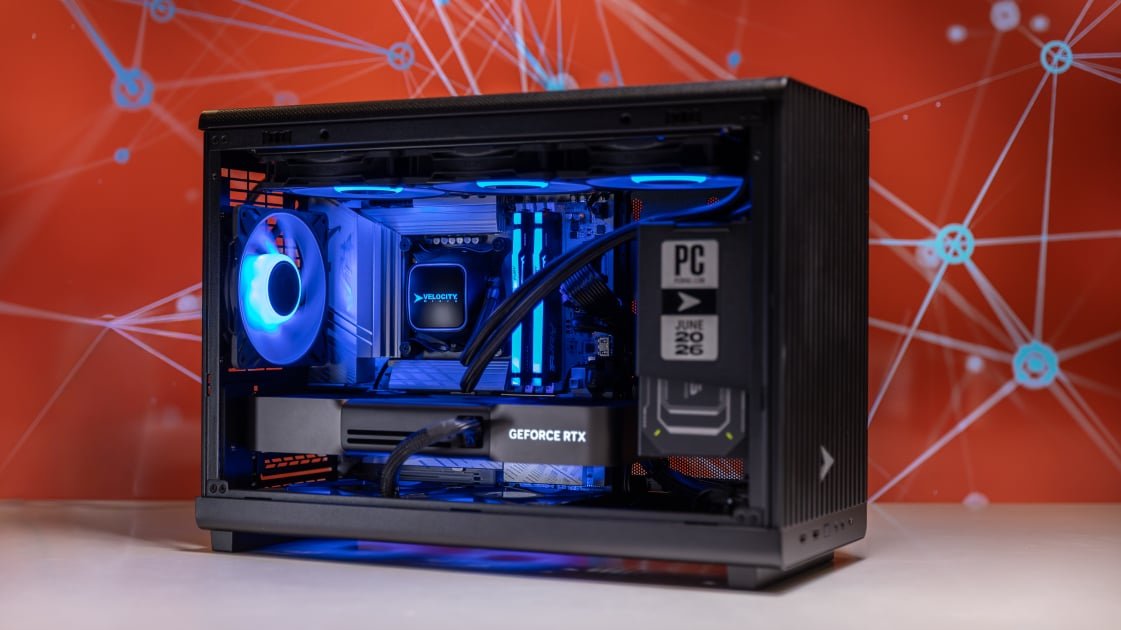
The Velocity Micro Raptor Z55a sat proudly among the best desktops (much less gaming models) we tested in 2025, thanks to fiery performance, long-term support, professional tuning, and overall top-end value. It’s no surprise, then, that this Intel-based 2026 refresh is poised for a repeat win. You’ll spot a few little dings that keep the Raptor Z55i (starting at $2,499, $5,999 as tested) from perfection. But given its much lower price versus similarly configured gaming desktops, this is the rig you want if you care about performance first. If you’re looking for something with a deeper gamer aesthetic, the Maingear MG-1 MK. II might be more your style; it holds the throne in our “cost-no-object” category. The new Z55a, though, is our new Editors’ Choice pick for high-end gaming desktops.
One of the major selling points for a gaming PC like the Raptor Z55i is its plentiful configuration options. As a custom builder, Velocity Micro lets you choose among AMD and Intel processors, AMD and Nvidia graphics cards, and Kingston, Samsung, or Western Digital solid-state storage. The $5,999 configuration reviewed here houses a 24-core Intel Core Ultra 7 270K Plus processor (eight Performance cores plus 16 Efficient cores, with support for 24 threads), an Nvidia GeForce RTX 5090 Founders Edition GPU with 32GB GDDR7 video memory, 64GB of DDR5 system memory clocked at 6,600 megatransfers per second (MT/s), and a 2TB NVMe M.2 SSD on a PCI Express 4.0 slot.

(Credit: Joseph Maldonado)
Velocity Micro’s entry-level AMD-based configuration features a six-core (12-thread) AMD Ryzen 5 9600X processor, an 8GB Nvidia GeForce RTX 5060, 32GB of DDR5-5200 RAM, and a 1TB SSD for $2,739 at publishing time. The entry-level Intel configuration ($2,499) is nearly identical, except it comes with an 18-core Intel Core Ultra 5 250K Plus processor (six P-cores plus 12 E-cores; 18 threads) and Wi-Fi 7 support, rather than the Wi-Fi 6E of the AMD build.
Here’s one important thing to note, given that this is a high-end system: The Raptor Z55 series has no option for a PCI Express 5.0 SSD, even though the AMD and Intel motherboards included in the build support PCIe 5.0 drives. This will come up later when I discuss the Raptor’s performance, but for a PC more than five grand, you’d be forgiven for assuming a PCIe 5.0 drive would at least be an option.
The Raptor Z55i doesn’t look like your typical gaming tower PC, with a glass side panel that showcases a panoply of high-end components, flashy lighting, and clever cable management. Instead, it looks like a high-end workstation desktop used by creative types, whether that’s video editors, 3D modelers, or CAD engineers.

(Credit: Joseph Maldonado)
Velocity Micro’s Raptor Z55 case, called the MX6, is a micro-tower enclosure (12 by 7.6 by 17.5 inches, HWD) that supports a MicroATX or Mini-ITX motherboard. It uses toolless mesh panels that prioritize airflow over showing the interior—though if you have components with RGB lighting, you’ll still see some of it, and the subtle effect it creates might be the kind of thing you’re going for.

(Credit: Joseph Maldonado)
The front of the panel has a long vertical grille over the mesh behind it. That’s the case’s only other style element besides the Velocity Micro logo just above the front-panel I/O ports and power switch. While not as boring as a ’90s beige box with disk drives up front, this case leans far more into the functional side than your typical gaming PC. This look is potentially divisive—either you appreciate this “sleeper PC” aesthetic, or you want more RGB action.
In theory, everything in the Raptor Z55 case is upgradable, so long as the new parts fit into its limited space. This test system has the most capable current products from Intel’s and Nvidia’s consumer CPU and GPU lines. Future generations of silicon might require new motherboards or other updates, such as a more substantial power supply unit (PSU), but this case should easily accommodate those updated parts, since it doesn’t rely on any proprietary designs.
The Gigabyte Z890M motherboard in my review unit features one PCIe 5.0 x16 slot, two PCIe 4.0 x16 slots, four DDR5 RAM slots (with supported overclock speeds of up to 9,200MT/s), three M.2 SSD slots (one PCIe 5.0, two PCIe 4.0), and four SATA connectors.
The case is also long enough front-to-back to accommodate most GeForce RTX 5090 cards with a bit of clearance, so you shouldn’t have any issues if you buy a new GPU. If you pick up a special-edition graphics card that is longer, though, measure first to make sure it will fit.

(Credit: Joseph Maldonado)
You’ll also find a horizontal brace along the open side panel that can fit three 120mm fans with a radiator, in case you want to upgrade to a liquid-cooled GPU alongside your liquid-AIO-cooled CPU. Velocity Micro also included space at the top of the case for a 360mm AIO radiator and fans, offering plenty of cooling options. In our test configuration, the system is cooled by a 360mm AIO; the heat exchanger on the CPU is topped by a custom Velocity Micro logo panel.
For traditional storage, you’ll find two bays for 2.5-inch SSDs, or one 2.5-inch drive and one 3.5-inch hard drive. As for the PSU, you can install an alternate ATX-format PSU, but non-modular PSUs with lots of extra cables might pose a fitment issue in Velocity Micro’s MX6 case. You’ll want to stick with modular models that let you omit any unused cables.

(Credit: Joseph Maldonado)
You might assume that popping open the case and messing with the internals will void the PC’s warranty, but Velocity Micro will continue to honor the warranty on each component it installed in the build. Eventually, you might upgrade every part of the product to the point where your warranty will apply only to the case!
It’s also worth noting that if none of this upgrade talk makes sense to you, or if you simply don’t want the hassle of doing it yourself, Velocity Micro has a program that lets you ship the PC back for a variety of upgrades for a $299 fee, plus the price of the hardware itself and the shipping costs.
The number and type of rear connections on the Raptor Z55 series will depend on which motherboard and processor you configure it with. The Gigabyte Z890M motherboard in my review unit features one 40Gbps USB4 Type-C port and nine lesser-speed Type-A ports: one 10Gbps, four 5Gbps, and four 480Mbps. You’ll also find a Wi-Fi 7 antenna connector, a 2.5Gbps Ethernet jack, and an HDMI 2.1 output for the CPU-integrated graphics. Finally, the board includes two 3.5mm jacks for audio and microphone, and an S/PDIF-out connector.

(Credit: Joseph Maldonado)
This case’s front panel, meanwhile, houses two 5Gbps USB Type-A ports, one 5Gbps USB Type-C, and two 3.5mm audio jacks (for headphone and mic).

(Credit: Joseph Maldonado)
In addition to the Ethernet jack, the board includes Bluetooth 5.4 with its Wi-Fi 7 support. However, if you go with AMD instead, Velocity Micro offers just one motherboard option across all processor tiers, and it supports Wi-Fi 6E only. (This may not matter one way or another to true hard-core gamers, who will trust only wired connections; Ethernet is inherently more stable.)
To measure the Raptor Z55i’s overall performance across various categories like gaming and creative work, I’ve pulled together some of the Raptor’s top high-end competition to see how this PC stacks up by the numbers…
First among these competitors is our current Editors’ Choice pick for high-end gaming desktops, the Origin PC Neuron ($4,766 as tested). Following that is our budget-torching $7,567 Maingear MG-1 MK. II review configuration, the current editors’ title-holder for cost-no-object models, and the Corsair One i600 ($4,499.99 as tested), a similar small-form-factor pick with less power. Finally, the $4,649.99 Alienware Area-51 we’ve tested rounds out the list with a big-box manufacturer’s answer to these boutique builders. These all fall squarely in the premium high-end gaming PC bracket, but also remember the Raptor’s size and price relative to the numbers you’re about to see.
Our primary overall benchmark, UL’s PCMark 10, puts a system through its paces in productivity apps ranging from web browsing to word processing and spreadsheet work. Its Full System Drive subtest measures a PC’s storage throughput.
Three more tests we rely on are CPU-centric or processor-intensive: Maxon’s Cinebench 2024 uses that company’s Cinema 4D engine to render a complex scene; Primate Labs’ Geekbench 6.3 Pro simulates popular apps ranging from PDF rendering and speech recognition to machine learning; and we see how long it takes the video transcoder HandBrake 1.8 to convert a 12-minute clip from 4K to 1080p resolution. Finally, workstation maker Puget Systems’ PugetBench for Creators rates a PC’s image-editing prowess through a variety of automated operations in the seminal photo editor Adobe Photoshop 25.
Here, the Intel Core Ultra 7 270K Plus generally defeated the competition, sometimes by a broad margin despite that extremely narrow PCMark 10 loss. It even outpaced the Core Ultra 9 285K in the Corsair and Alienware boxes. This system didn’t lead in two tests, though: the PCMark 10 Storage test and PugetBench’s Adobe Photoshop test.
The first was down to the other PCs on this list using PCIe 5.0 SSDs versus the slower PCIe 4.0 model in the Raptor Z55i. If you’ve been OK with PCIe 4.0 speeds so far, this isn’t an issue. However, if you were hoping for that new quickness for whatever reason, it’s worth considering. (Also remember that name-brand 2TB PCIe 5.0 SSDs are difficult to find for less than $400 at publishing time.) The second was thanks to the Maingear rig’s super-fresh AMD Ryzen 9 9950X3D2 Dual Edition CPU, which gets a boost in some content-creation tasks via its extra on-chip cache.
It’s also worth noting that generally, the Raptor broke even or slightly underperformed its rivals in synthetic single-core performance. Still, it was by only a few percentage points, and it makes up for this with its potent multi-core performance. It’s just interesting seeing where Intel has focused its improvements lately play out in test results.
We challenge all desktop graphics with a quintet of animations or gaming simulations from UL’s 3DMark test suite. The first two, Wild Life (1440p) and Wild Life Extreme (4K), use the Vulkan graphics API to measure GPU speeds. The second pair, Steel Nomad’s regular and Light subtests, focus on APIs more commonly used for game development to assess gaming geometry and particle effects. The last, Solar Bay, measures ray tracing performance in a synthetic environment. (This benchmark uses Vulkan on Windows and Android, and Metal on Apple devices, subjecting 3D scenes to increasingly intense ray-traced workloads at 1440p.)
Our real-world gaming testing is based on in-game benchmarks for Call of Duty: Modern Warfare 3, Cyberpunk 2077, and F1 2024. These three games—all benchmarked at full HD (1080p or 1200p), 2K (1440p or 1600p), and 4K (2160p) resolution—represent competitive shooter, open-world, and simulation games, respectively. Each game is run at high detail or the highest available settings, and measured in frames per second (fps).
We run the Call of Duty benchmark at the Extreme graphics preset. Because the test can produce triple-digit frame rates even on low-end PCs at this setting, this approach helps evaluate high-frame-rate performance. Our Cyberpunk 2077 test settings aim to push PCs to their limit, so we run it on the all-out Ray Tracing Overdrive preset without DLSS or FSR. Finally, F1 2024 measures a GPU’s ability to render high-polygon-count models and densely detailed environments.
On graphics performance, the Raptor Z55i’s only real competition here was the Maingear MG-1 MK. II, which also runs on an RTX 5090. The difference, though, is that the Maingear PC has that X3D2 chip, and AMD’s X3D silicon is specifically designed to boost 1080p and 1440p frame rates in gaming, which is ultimately how 3DMark’s tests are scored. The MG-1 managed to edge the Raptor out of four of five 3DMark wins, while the Raptor eked out a victory in the Solar Bay ray-tracing benchmark.
For gaming, the PCs that most likely to challenge to the Raptor Z55i are those with AMD’s 3D V-Cache chips, namely the Origin and Maingear models. In 1080p gaming, which is much more CPU-bound, the Raptor fell behind in F1 2024, even when up against the RTX 5080 boxes, but made up for this in the other tests. This dynamic also melted away entirely when we enabled ray tracing or set things to 4K, which is much more dependent on your GPU’s silicon and memory resources.
Here, the Raptor’s only competition was the Maingear tower, and the two ground it out to an effective draw, with differences of no more than 15 frames at sharper resolutions in Call of Duty and Cyberpunk. (Remember, you’re already seeing playable 4K numbers in some games here.) The key takeaway here is that the Raptor Z55i remained competitive despite costing more than $1,500 less, making it a rare value in this performance tier.
Final Thoughts
 (Credit: Joseph Maldonado)
Velocity Micro Raptor Z55i (2026)
Editors’ Choice
4.5
Outstanding
What Our Ratings Mean
- 5.0 – Exemplary: Near perfection, ground-breaking
- 4.5 – Outstanding: Best in class, acts as a benchmark for measuring competitors
- 4.0 – Excellent: A performance, feature, or value leader in its class, with few shortfalls
- 3.5 – Good: Does what the product should do, and does so better than many competitors
- 3.0 – Average: Does what the product should do, and sits in the middle of the pack
- 2.5 – Fair: We have some reservations, buy with caution
- 2.0 – Subpar: We do not recommend, buy with extreme caution
- 1.5 – Poor: Do not buy this product
- 1.0 – Dismal: Don’t even think about buying this product
Read Our Editorial Mission Statement and Testing Methodologies.
The previous-generation Velocity Micro Raptor Z55 was one of PCMag’s best products of 2025 for a reason, and this 2026 update stakes a fresh claim to that position as our new Editors’ Choice pick for high-end gaming. The lack of PCIe 5.0 storage at this price point doesn’t do the Raptor any favors, but the PCIe 4.0 drive is more than enough for most needs.
To be sure, if you’re able to pay this much money for a PC, the value proposition might not be the biggest factor here. Still, given the current state of the economy, the Raptor Z55i hits the sweet spot between ultimate high-end performance and cost, making it one of the best-value premium gaming PCs you can buy today.
About Our Expert

John Loeffler
Contributor
Experience
John (he/him) is a programmer, gamer, activist, and Brooklyn College alum currently living in Brooklyn, New York.
Named by the CTA as a CES 2020 Media Trailblazer for his science and technology reporting, John specializes in all areas of computer science, including industry news, hardware reviews, and PC gaming. He’s also well-versed in general science writing and the social impact of the tech industry.
John has a Bachelor’s degree in English and a Master’s degree in Computer Science. You can usually find him on Bluesky, where you’ll get his hot takes on stuff, as well as his reposts of content that is almost as good as the worst stuff you used to be able to find on Vine. Beyond PC gaming, he spends his evenings building digital circuits, multiboxing Linux kernels, and coding shell scripts.